 # K9s - Kubernetes CLI To Manage Your Clusters In Style!
K9s provides a curses based terminal UI to interact with your Kubernetes clusters.
The aim of this project is to make it easier to navigate, observe and manage
your applications in the wild. K9s continually watches Kubernetes
for changes and offers subsequent commands to interact with observed resources.
---
[](https://goreportcard.com/report/github.com/derailed/k9s)
[](https://travis-ci.com/derailed/k9s)
[](https://github.com/derailed/k9s/releases)
[](https://github.com/mum4k/termdash/blob/master/LICENSE)
---
## Installation
K9s is available on Linux, OSX and Windows platforms.
* Binaries for Linux, Windows and Mac are available as tarballs in the [release](https://github.com/derailed/k9s/releases) page.
* For OSX using Homebrew
```shell
brew tap derailed/k9s && brew install k9s
```
* Building from source
K9s was built using go 1.12 or above. In order to build K9 from source you must:
1. Clone the repo
2. Set env var *GO111MODULE=on*
3. Add the following command in your go.mod file
```text
replace (
github.com/derailed/k9s => MY_K9S_CLONED_GIT_REPO
)
```
4. Build and run the executable
```shell
go run main.go
```
---
## The Command Line
```shell
# List all available CLI options
k9s -h
# To get info about K9s runtime (logs, configs, etc..)
k9s info
# To run K9s in a given namespace
k9s -n mycoolns
# Start K9s in an existing KubeConfig context
k9s --context coolCtx
```
---
## PreFlight Checks
* K9s uses 256 colors terminal mode. On `Nix system make sure TERM is set accordingly.
```shell
export TERM=xterm-256color
```
---
## K9s config file ($HOME/.k9s/config.yml)
K9s keeps its configurations in a dot file in your home directory.
> NOTE: This is still in flux and will change while in pre-release stage!
```yaml
k9s:
# Indicates api-server poll intervals.
refreshRate: 2
# Indicates log view maximum buffer size. Default 1k lines.
logBufferSize: 200
# Indicates how many lines of logs to retrieve from the api-server. Default 200 lines.
logRequestSize: 200
# Indicates the current kube context. Defaults to current context
currentContext: minikube
# Indicates the current kube cluster. Defaults to current context cluster
currentCluster: minikube
# Persists per cluster preferences for favorite namespaces and view.
clusters:
cooln:
namespace:
active: coolio
favorites:
- cassandra
- default
view:
active: po
minikube:
namespace:
active: all
favorites:
- all
- kube-system
- default
view:
active: dp
```
---
## Benchmarking (Way early Pupp!)
K9s integrates [Hey](https://github.com/rakyll/hey) from the brilliant and super talented [Jaana Dogan](https://github.com/rakyll) of Google fame. This is a preliminary feature and is only supports for port-forwards and very limited NodePort/LoadBalancer services at this time (Read the paint is way fresh!).
The `Hey` tool is currently being used to benchmark port-forwards. Services and ingresses will be fully enabled next. To setup a port-forward, you will need to navigate to the pod view, select a pod and a container that exposes a port. Using `SHIFT-F` a dialog will come up to allow you to pick a local port to forward to. Once successfull, K9s will take you the port-forward view (alias `pf`) listing out you currently active port-forwards. Selecting a port-forward and using `CTRL-B` will run a benchmark on that container. To view the results of your benchmark runs, go to the benchmark view (alias `be`). You should now be able to select a benchmark and view the run stats details by pressing ``.
Initially, the benchmark will(may?) run with the following defaults:
* Concurrency Level: 1
* Number of Requests: 200
* HTTP Verb: GET
* Path: /
NOTE: In case it wasn't abundantly obvious this a super early release. It does however given you some insights by putting a container under load to help with resources/auto-scaling settings or a quick first glance at comparing Canary's implementation. At this time, we're trying to steel-thread thru the basic mechanics and then escalate to wider use cases once the essentials are in place. So please thread lightly and aim small as port-forwards and heavy benchmarking will most likely cause K9s to kick over.
The port forward view is backed by a new K9s config file namely: `$HOME/.k9s/bench-mycluster.yml`. Each cluster you will connect to will have its own bench config file. Changes to this file should update the port-forward view to indicate how you want to run your benchmarks.
Here is a sample benchmarks.yml configuration. Please keep in mind this file will change!
Provision for specifying auth, headers, payload, etc... will be coming soon...
```yaml
# This file resides in $HOME/.k9s/benchmarks.yml
benchmarks:
# Indicates the default setting if a container or service rule does not match.
defaults:
# One concurrent connection
concurrency: 1
# 500 requests will be sent to an endpoint
requests: 500
containers:
# Containers will need to match a container name whose port has been forwarded.
# NOTE: the container ID syntax uses namespace/pod_name:container_name
default/nginx:nginx:
# Benchmark the container named nginx using GET HTTP verb using http://localhost:someport/
concurrency: 1
requests: 10000
path: /bozo
method: POST
body:
{"fred":"blee"}
header:
Accept:
- text/html
Content-Type:
- application/json
services:
# Benchmark a service exposed either via nodeport, loadbalancer.
default/nginx:
concurrency: 1
requests: 500
method: GET
# This setting will depend on whether service is nodeport or loadbalancer.
# Set this to a node if nodeport or LB if applicable. IP or dns name.
address: super.dev
path: /bumblebeetuna
auth:
user: jeanbaptiste
password: Zorg!
```
---
## Key Bindings
K9s uses aliases to navigate most K8s resources.
| Command | Result | Example |
|-----------------------|----------------------------------------------------|----------------------------|
| `:`alias`` | View a Kubernetes resource aliases | `:po` |
| `?` | Show keyboard shortcuts and help | |
| `Ctrl-a` | Show all available resource alias | select+`` to view |
| `/`filter`ENTER`> | Filter out a resource view given a filter | `/bumblebeetuna` |
| `` | Bails out of command mode | |
| `d`,`v`, `e`, `l`,... | Key mapping to describe, view, edit, view logs,... | `d` (describes a resource) |
| `:`ctx`` | To view and switch to another Kubernetes context | `:`+`ctx`+`` |
| `:q`, `Ctrl-c` | To bail out of K9s | |
---
## Demo Video
1. [K9s Demo](https://youtu.be/k7zseUhaXeU)
## Screenshots
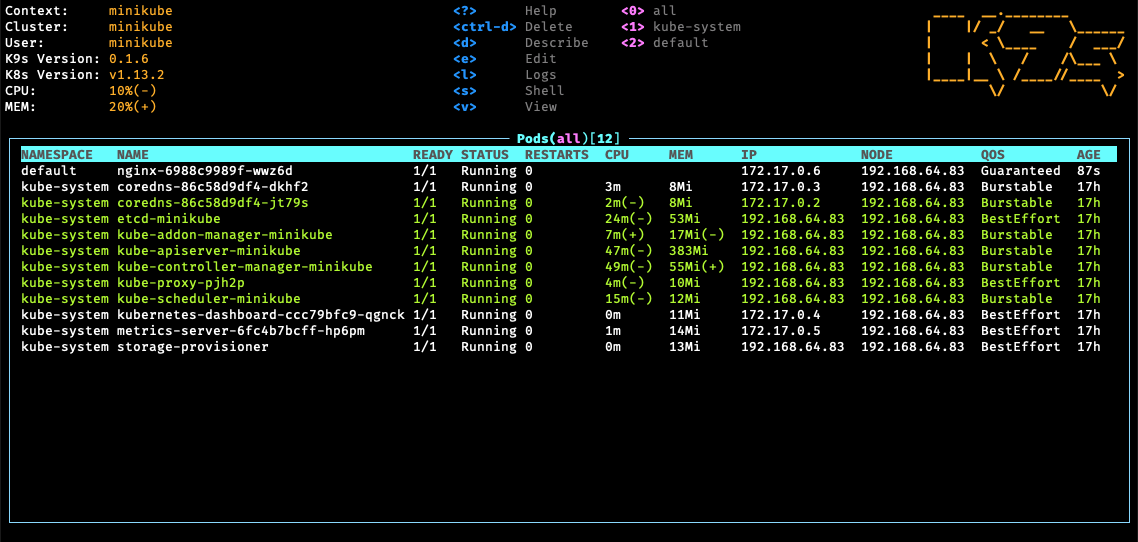
1. Pods
# K9s - Kubernetes CLI To Manage Your Clusters In Style!
K9s provides a curses based terminal UI to interact with your Kubernetes clusters.
The aim of this project is to make it easier to navigate, observe and manage
your applications in the wild. K9s continually watches Kubernetes
for changes and offers subsequent commands to interact with observed resources.
---
[](https://goreportcard.com/report/github.com/derailed/k9s)
[](https://travis-ci.com/derailed/k9s)
[](https://github.com/derailed/k9s/releases)
[](https://github.com/mum4k/termdash/blob/master/LICENSE)
---
## Installation
K9s is available on Linux, OSX and Windows platforms.
* Binaries for Linux, Windows and Mac are available as tarballs in the [release](https://github.com/derailed/k9s/releases) page.
* For OSX using Homebrew
```shell
brew tap derailed/k9s && brew install k9s
```
* Building from source
K9s was built using go 1.12 or above. In order to build K9 from source you must:
1. Clone the repo
2. Set env var *GO111MODULE=on*
3. Add the following command in your go.mod file
```text
replace (
github.com/derailed/k9s => MY_K9S_CLONED_GIT_REPO
)
```
4. Build and run the executable
```shell
go run main.go
```
---
## The Command Line
```shell
# List all available CLI options
k9s -h
# To get info about K9s runtime (logs, configs, etc..)
k9s info
# To run K9s in a given namespace
k9s -n mycoolns
# Start K9s in an existing KubeConfig context
k9s --context coolCtx
```
---
## PreFlight Checks
* K9s uses 256 colors terminal mode. On `Nix system make sure TERM is set accordingly.
```shell
export TERM=xterm-256color
```
---
## K9s config file ($HOME/.k9s/config.yml)
K9s keeps its configurations in a dot file in your home directory.
> NOTE: This is still in flux and will change while in pre-release stage!
```yaml
k9s:
# Indicates api-server poll intervals.
refreshRate: 2
# Indicates log view maximum buffer size. Default 1k lines.
logBufferSize: 200
# Indicates how many lines of logs to retrieve from the api-server. Default 200 lines.
logRequestSize: 200
# Indicates the current kube context. Defaults to current context
currentContext: minikube
# Indicates the current kube cluster. Defaults to current context cluster
currentCluster: minikube
# Persists per cluster preferences for favorite namespaces and view.
clusters:
cooln:
namespace:
active: coolio
favorites:
- cassandra
- default
view:
active: po
minikube:
namespace:
active: all
favorites:
- all
- kube-system
- default
view:
active: dp
```
---
## Benchmarking (Way early Pupp!)
K9s integrates [Hey](https://github.com/rakyll/hey) from the brilliant and super talented [Jaana Dogan](https://github.com/rakyll) of Google fame. This is a preliminary feature and is only supports for port-forwards and very limited NodePort/LoadBalancer services at this time (Read the paint is way fresh!).
The `Hey` tool is currently being used to benchmark port-forwards. Services and ingresses will be fully enabled next. To setup a port-forward, you will need to navigate to the pod view, select a pod and a container that exposes a port. Using `SHIFT-F` a dialog will come up to allow you to pick a local port to forward to. Once successfull, K9s will take you the port-forward view (alias `pf`) listing out you currently active port-forwards. Selecting a port-forward and using `CTRL-B` will run a benchmark on that container. To view the results of your benchmark runs, go to the benchmark view (alias `be`). You should now be able to select a benchmark and view the run stats details by pressing ``.
Initially, the benchmark will(may?) run with the following defaults:
* Concurrency Level: 1
* Number of Requests: 200
* HTTP Verb: GET
* Path: /
NOTE: In case it wasn't abundantly obvious this a super early release. It does however given you some insights by putting a container under load to help with resources/auto-scaling settings or a quick first glance at comparing Canary's implementation. At this time, we're trying to steel-thread thru the basic mechanics and then escalate to wider use cases once the essentials are in place. So please thread lightly and aim small as port-forwards and heavy benchmarking will most likely cause K9s to kick over.
The port forward view is backed by a new K9s config file namely: `$HOME/.k9s/bench-mycluster.yml`. Each cluster you will connect to will have its own bench config file. Changes to this file should update the port-forward view to indicate how you want to run your benchmarks.
Here is a sample benchmarks.yml configuration. Please keep in mind this file will change!
Provision for specifying auth, headers, payload, etc... will be coming soon...
```yaml
# This file resides in $HOME/.k9s/benchmarks.yml
benchmarks:
# Indicates the default setting if a container or service rule does not match.
defaults:
# One concurrent connection
concurrency: 1
# 500 requests will be sent to an endpoint
requests: 500
containers:
# Containers will need to match a container name whose port has been forwarded.
# NOTE: the container ID syntax uses namespace/pod_name:container_name
default/nginx:nginx:
# Benchmark the container named nginx using GET HTTP verb using http://localhost:someport/
concurrency: 1
requests: 10000
path: /bozo
method: POST
body:
{"fred":"blee"}
header:
Accept:
- text/html
Content-Type:
- application/json
services:
# Benchmark a service exposed either via nodeport, loadbalancer.
default/nginx:
concurrency: 1
requests: 500
method: GET
# This setting will depend on whether service is nodeport or loadbalancer.
# Set this to a node if nodeport or LB if applicable. IP or dns name.
address: super.dev
path: /bumblebeetuna
auth:
user: jeanbaptiste
password: Zorg!
```
---
## Key Bindings
K9s uses aliases to navigate most K8s resources.
| Command | Result | Example |
|-----------------------|----------------------------------------------------|----------------------------|
| `:`alias`` | View a Kubernetes resource aliases | `:po` |
| `?` | Show keyboard shortcuts and help | |
| `Ctrl-a` | Show all available resource alias | select+`` to view |
| `/`filter`ENTER`> | Filter out a resource view given a filter | `/bumblebeetuna` |
| `` | Bails out of command mode | |
| `d`,`v`, `e`, `l`,... | Key mapping to describe, view, edit, view logs,... | `d` (describes a resource) |
| `:`ctx`` | To view and switch to another Kubernetes context | `:`+`ctx`+`` |
| `:q`, `Ctrl-c` | To bail out of K9s | |
---
## Demo Video
1. [K9s Demo](https://youtu.be/k7zseUhaXeU)
## Screenshots
1. Pods
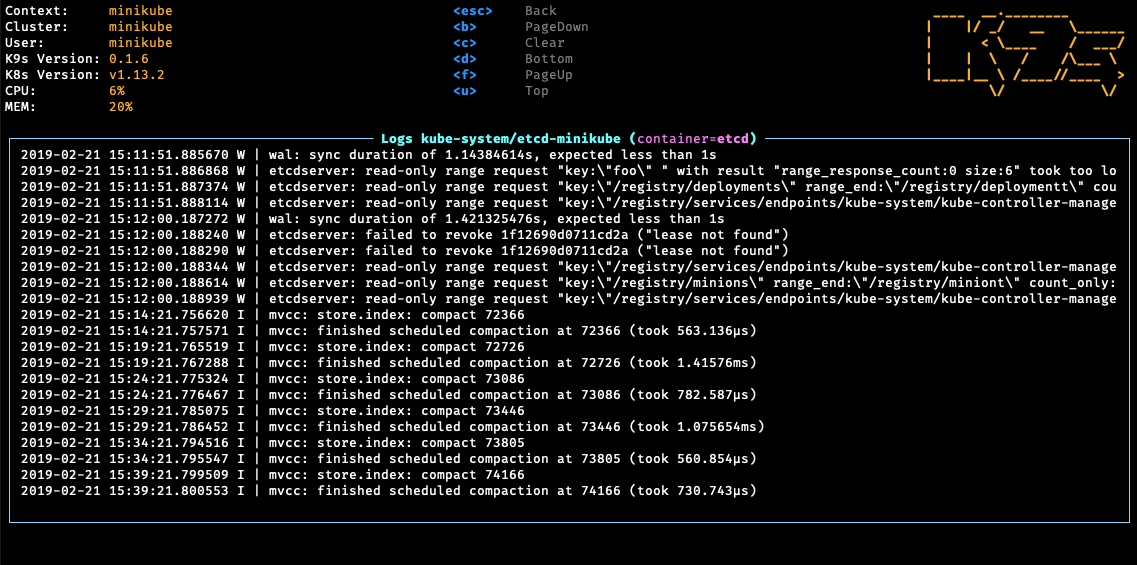
 1. Logs
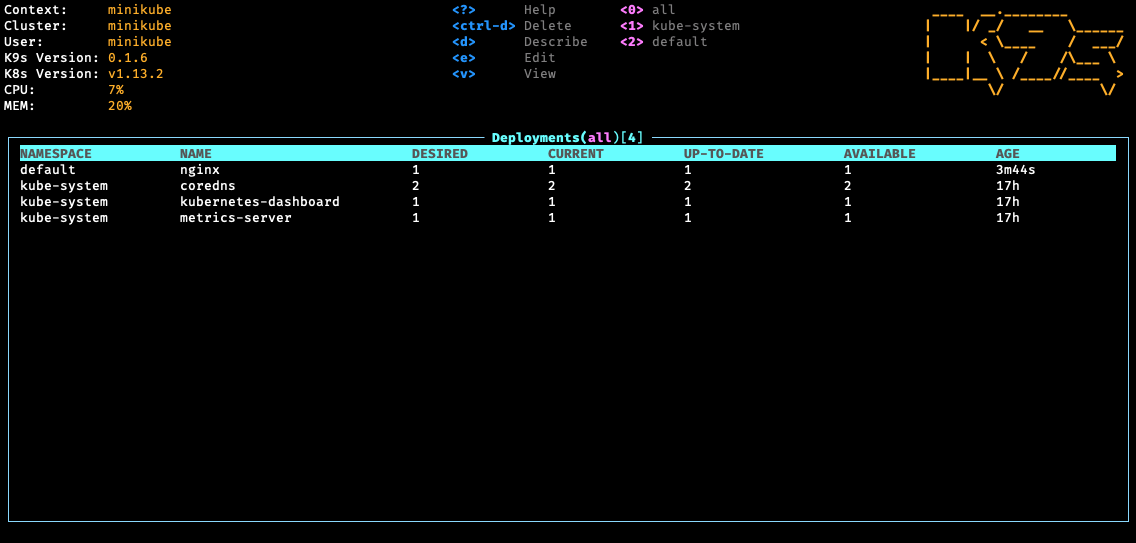
 1. Deployments
 ---
## K9s RBAC FU
On RBAC enabled clusters, you would need to give your users/groups capabilities so that they can use K9s to explore Kubernetes cluster.
K9s needs minimaly read privileges at both the cluster and namespace level to display resources and metrics.
These rules below are just suggestions. You will need to customize them based on your environment policies. If you need to edit/delete resources extra Fu will be necessary.
> NOTE! Cluster/Namespace access may change in the future as K9s evolves.
> NOTE! We expect K9s to keep running even in atrophied clusters/namespaces. Please file issues if this is not the case!
### Cluster RBAC scope
```yaml
---
# K9s Reader ClusterRole
kind: ClusterRole
apiVersion: rbac.authorization.k8s.io/v1
metadata:
name: k9s
rules:
# Grants RO access to cluster resources node and namespace
- apiGroups: [""]
resources: ["nodes", "namespaces"]
verbs: ["get", "list", "watch"]
# Grants RO access to RBAC resources
- apiGroups: ["rbac.authorization.k8s.io"]
resources: ["clusterroles", "roles", "clusterrolebindings", "rolebindings"]
verbs: ["get", "list", "watch"]
# Grants RO access to CRD resources
- apiGroups: ["apiextensions.k8s.io"]
resources: ["customresourcedefinitions"]
verbs: ["get", "list", "watch"]
# Grants RO access to netric server
- apiGroups: ["metrics.k8s.io"]
resources: ["nodes", "pods"]
verbs: ["list"]
---
# Sample K9s user ClusterRoleBinding
apiVersion: rbac.authorization.k8s.io/v1
kind: ClusterRoleBinding
metadata:
name: k9s
subjects:
- kind: User
name: fernand
apiGroup: rbac.authorization.k8s.io
roleRef:
kind: ClusterRole
name: k9s
apiGroup: rbac.authorization.k8s.io
```
### Namespace RBAC scope
If your users are constrained to certain namespaces, K9s will need to following role to enable read access to namespaced resources.
```yaml
---
# K9s Reader Role (default namespace)
kind: Role
apiVersion: rbac.authorization.k8s.io/v1
metadata:
name: k9s
namespace: default
rules:
# Grants RO access to most namespaced resources
- apiGroups: ["", "apps", "autoscaling", "batch", "extensions"]
resources: ["*"]
verbs: ["get", "list", "watch"]
---
# Sample K9s user RoleBinding
apiVersion: rbac.authorization.k8s.io/v1
kind: RoleBinding
metadata:
name: k9s
namespace: default
subjects:
- kind: User
name: fernand
apiGroup: rbac.authorization.k8s.io
roleRef:
kind: Role
name: k9s
apiGroup: rbac.authorization.k8s.io
```
---
## Skins
You can style K9s based on your own sense of style and look. This is very much an experimental feature at this time, more will be added/modified if this feature has legs so thread accordingly!
Skins are YAML files, that enable a user to change K9s presentation layer. K9s skins are loaded from `$HOME/.k9s/skin.yml`. If a skin file is detected then the skin would be loaded if not the current stock skin remains in effect.
Below is a sample skin file, more skins would be available in the skins directory, just simply copy any of these in your user's home dir as `skin.yml`.
```yaml
# InTheNavy Skin...
k9s:
# General K9s styles
fgColor: dodgerblue
bgColor: white
logoColor: blue
# ClusterInfoView styles.
info:
fgColor: lightskyblue
sectionColor: steelblue
# Borders styles.
border:
fgColor: dodgerblue
focusColor: aliceblue
# MenuView attributes and styles.
menu:
fgColor: darkblue
keyColor: cornflowerblue
# Used for favorite namespaces
numKeyColor: cadetblue
# CrumbView attributes for history navigation.
crumb:
fgColor: white
bgColor: steelblue
# Active view settings
activeColor: skyblue
# TableView attributes.
table:
fgColor: blue
bgColor: darkblue
cursorColor: aqua
# Header row styles.
header:
fgColor: white
bgColor: darkblue
sorterColor: orange
# Resource status and update styles
status:
newColor: blue
modifyColor: powderblue
addColor: lightskyblue
errorColor: indianred
highlightcolor: royalblue
killColor: slategray
completedColor: gray
# Border title styles.
title:
fgColor: aqua
bgColor: white
highlightColor: skyblue
counterColor: slateblue
filterColor: slategray
# YAML info styles.
yaml:
keyColor: steelblue
colonColor: blue
valueColor: royalblue
# Logs styles.
yaml:
fgColor: white
bgColor: black
```
Available color names are defined below:
| Color Names | | | | |
|----------------------|----------------|------------------|-------------------|-----------------|
| black | maroon | green | olive | navy |
| purple | teal | silver | gray | red |
| lime | yellow | blue | fuchsia | aqua |
| white | aliceblue | antiquewhite | aquamarine | azure |
| beige | bisque | blanchedalmond | blueviolet | brown |
| burlywood | cadetblue | chartreuse | chocolate | coral |
| cornflowerblue | cornsilk | crimson | darkblue | darkcyan |
| darkgoldenrod | darkgray | darkgreen | darkkhaki | darkmagenta |
| darkolivegreen | darkorange | darkorchid | darkred | darksalmon |
| darkseagreen | darkslateblue | darkslategray | darkturquoise | darkviolet |
| deeppink | deepskyblue | dimgray | dodgerblue | firebrick |
| floralwhite | forestgreen | gainsboro | ghostwhite | gold |
| goldenrod | greenyellow | honeydew | hotpink | indianred |
| indigo | ivory | khaki | lavender | lavenderblush |
| lawngreen | lemonchiffon | lightblue | lightcoral | lightcyan |
| lightgoldenrodyellow | lightgray | lightgreen | lightpink | lightsalmon |
| lightseagreen | lightskyblue | lightslategray | lightsteelblue | lightyellow |
| limegreen | linen | mediumaquamarine | mediumblue | mediumorchid |
| mediumpurple | mediumseagreen | mediumslateblue | mediumspringgreen | mediumturquoise |
| mediumvioletred | midnightblue | mintcream | mistyrose | moccasin |
| navajowhite | oldlace | olivedrab | orange | orangered |
| orchid | palegoldenrod | palegreen | paleturquoise | palevioletred |
| papayawhip | peachpuff | peru | pink | plum |
| powderblue | rebeccapurple | rosybrown | royalblue | saddlebrown |
| salmon | sandybrown | seagreen | seashell | sienna |
| skyblue | slateblue | slategray | snow | springgreen |
| steelblue | tan | thistle | tomato | turquoise |
| violet | wheat | whitesmoke | yellowgreen | grey |
| dimgrey | darkgrey | darkslategrey | lightgrey | lightslategrey |
| slategrey | | | | |
---
## Known Issues
This initial drop is brittle. K9s will most likely blow up...
1. You're running older versions of Kubernetes. K9s works best Kubernetes 1.12+.
1. You don't have enough RBAC fu to manage your cluster (see RBAC section below).
---
## Disclaimer
This is still work in progress! If there is enough interest in the Kubernetes
community, we will enhance per your recommendations/contributions. Also if you
dig this effort, please let us know that too!
---
## ATTA Girls/Boys!
K9s sits on top of many of opensource projects and libraries. Our *sincere*
appreciations to all the OSS contributors that work nights and weekends
to make this project a reality!
---
## Contact Info
1. **Email**: fernand@imhotep.io
2. **Twitter**: [@kitesurfer](https://twitter.com/kitesurfer?lang=en)
---
---
## K9s RBAC FU
On RBAC enabled clusters, you would need to give your users/groups capabilities so that they can use K9s to explore Kubernetes cluster.
K9s needs minimaly read privileges at both the cluster and namespace level to display resources and metrics.
These rules below are just suggestions. You will need to customize them based on your environment policies. If you need to edit/delete resources extra Fu will be necessary.
> NOTE! Cluster/Namespace access may change in the future as K9s evolves.
> NOTE! We expect K9s to keep running even in atrophied clusters/namespaces. Please file issues if this is not the case!
### Cluster RBAC scope
```yaml
---
# K9s Reader ClusterRole
kind: ClusterRole
apiVersion: rbac.authorization.k8s.io/v1
metadata:
name: k9s
rules:
# Grants RO access to cluster resources node and namespace
- apiGroups: [""]
resources: ["nodes", "namespaces"]
verbs: ["get", "list", "watch"]
# Grants RO access to RBAC resources
- apiGroups: ["rbac.authorization.k8s.io"]
resources: ["clusterroles", "roles", "clusterrolebindings", "rolebindings"]
verbs: ["get", "list", "watch"]
# Grants RO access to CRD resources
- apiGroups: ["apiextensions.k8s.io"]
resources: ["customresourcedefinitions"]
verbs: ["get", "list", "watch"]
# Grants RO access to netric server
- apiGroups: ["metrics.k8s.io"]
resources: ["nodes", "pods"]
verbs: ["list"]
---
# Sample K9s user ClusterRoleBinding
apiVersion: rbac.authorization.k8s.io/v1
kind: ClusterRoleBinding
metadata:
name: k9s
subjects:
- kind: User
name: fernand
apiGroup: rbac.authorization.k8s.io
roleRef:
kind: ClusterRole
name: k9s
apiGroup: rbac.authorization.k8s.io
```
### Namespace RBAC scope
If your users are constrained to certain namespaces, K9s will need to following role to enable read access to namespaced resources.
```yaml
---
# K9s Reader Role (default namespace)
kind: Role
apiVersion: rbac.authorization.k8s.io/v1
metadata:
name: k9s
namespace: default
rules:
# Grants RO access to most namespaced resources
- apiGroups: ["", "apps", "autoscaling", "batch", "extensions"]
resources: ["*"]
verbs: ["get", "list", "watch"]
---
# Sample K9s user RoleBinding
apiVersion: rbac.authorization.k8s.io/v1
kind: RoleBinding
metadata:
name: k9s
namespace: default
subjects:
- kind: User
name: fernand
apiGroup: rbac.authorization.k8s.io
roleRef:
kind: Role
name: k9s
apiGroup: rbac.authorization.k8s.io
```
---
## Skins
You can style K9s based on your own sense of style and look. This is very much an experimental feature at this time, more will be added/modified if this feature has legs so thread accordingly!
Skins are YAML files, that enable a user to change K9s presentation layer. K9s skins are loaded from `$HOME/.k9s/skin.yml`. If a skin file is detected then the skin would be loaded if not the current stock skin remains in effect.
Below is a sample skin file, more skins would be available in the skins directory, just simply copy any of these in your user's home dir as `skin.yml`.
```yaml
# InTheNavy Skin...
k9s:
# General K9s styles
fgColor: dodgerblue
bgColor: white
logoColor: blue
# ClusterInfoView styles.
info:
fgColor: lightskyblue
sectionColor: steelblue
# Borders styles.
border:
fgColor: dodgerblue
focusColor: aliceblue
# MenuView attributes and styles.
menu:
fgColor: darkblue
keyColor: cornflowerblue
# Used for favorite namespaces
numKeyColor: cadetblue
# CrumbView attributes for history navigation.
crumb:
fgColor: white
bgColor: steelblue
# Active view settings
activeColor: skyblue
# TableView attributes.
table:
fgColor: blue
bgColor: darkblue
cursorColor: aqua
# Header row styles.
header:
fgColor: white
bgColor: darkblue
sorterColor: orange
# Resource status and update styles
status:
newColor: blue
modifyColor: powderblue
addColor: lightskyblue
errorColor: indianred
highlightcolor: royalblue
killColor: slategray
completedColor: gray
# Border title styles.
title:
fgColor: aqua
bgColor: white
highlightColor: skyblue
counterColor: slateblue
filterColor: slategray
# YAML info styles.
yaml:
keyColor: steelblue
colonColor: blue
valueColor: royalblue
# Logs styles.
yaml:
fgColor: white
bgColor: black
```
Available color names are defined below:
| Color Names | | | | |
|----------------------|----------------|------------------|-------------------|-----------------|
| black | maroon | green | olive | navy |
| purple | teal | silver | gray | red |
| lime | yellow | blue | fuchsia | aqua |
| white | aliceblue | antiquewhite | aquamarine | azure |
| beige | bisque | blanchedalmond | blueviolet | brown |
| burlywood | cadetblue | chartreuse | chocolate | coral |
| cornflowerblue | cornsilk | crimson | darkblue | darkcyan |
| darkgoldenrod | darkgray | darkgreen | darkkhaki | darkmagenta |
| darkolivegreen | darkorange | darkorchid | darkred | darksalmon |
| darkseagreen | darkslateblue | darkslategray | darkturquoise | darkviolet |
| deeppink | deepskyblue | dimgray | dodgerblue | firebrick |
| floralwhite | forestgreen | gainsboro | ghostwhite | gold |
| goldenrod | greenyellow | honeydew | hotpink | indianred |
| indigo | ivory | khaki | lavender | lavenderblush |
| lawngreen | lemonchiffon | lightblue | lightcoral | lightcyan |
| lightgoldenrodyellow | lightgray | lightgreen | lightpink | lightsalmon |
| lightseagreen | lightskyblue | lightslategray | lightsteelblue | lightyellow |
| limegreen | linen | mediumaquamarine | mediumblue | mediumorchid |
| mediumpurple | mediumseagreen | mediumslateblue | mediumspringgreen | mediumturquoise |
| mediumvioletred | midnightblue | mintcream | mistyrose | moccasin |
| navajowhite | oldlace | olivedrab | orange | orangered |
| orchid | palegoldenrod | palegreen | paleturquoise | palevioletred |
| papayawhip | peachpuff | peru | pink | plum |
| powderblue | rebeccapurple | rosybrown | royalblue | saddlebrown |
| salmon | sandybrown | seagreen | seashell | sienna |
| skyblue | slateblue | slategray | snow | springgreen |
| steelblue | tan | thistle | tomato | turquoise |
| violet | wheat | whitesmoke | yellowgreen | grey |
| dimgrey | darkgrey | darkslategrey | lightgrey | lightslategrey |
| slategrey | | | | |
---
## Known Issues
This initial drop is brittle. K9s will most likely blow up...
1. You're running older versions of Kubernetes. K9s works best Kubernetes 1.12+.
1. You don't have enough RBAC fu to manage your cluster (see RBAC section below).
---
## Disclaimer
This is still work in progress! If there is enough interest in the Kubernetes
community, we will enhance per your recommendations/contributions. Also if you
dig this effort, please let us know that too!
---
## ATTA Girls/Boys!
K9s sits on top of many of opensource projects and libraries. Our *sincere*
appreciations to all the OSS contributors that work nights and weekends
to make this project a reality!
---
## Contact Info
1. **Email**: fernand@imhotep.io
2. **Twitter**: [@kitesurfer](https://twitter.com/kitesurfer?lang=en)
---
 © 2019 Imhotep Software LLC. All materials licensed under [Apache v2.0](http://www.apache.org/licenses/LICENSE-2.0)